
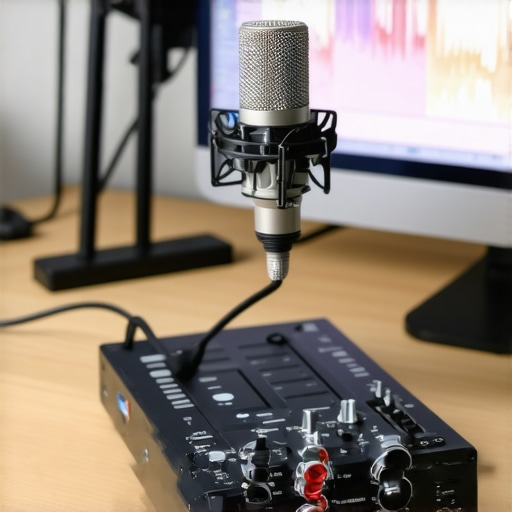
I vividly remember the first time I recorded a voiceover with my new XLR microphone, only to be met with an unsettling delay between my speech and what I heard through the headphones. It was like talking in a cave—disorienting and frustrating. That moment was a lightbulb flickering in my mind: latency isn’t just an annoyance; it can completely derail your flow and confidence in recording or live streaming. If you’ve experienced that jittery echo or that awkward delay, you’re not alone. Many creators, musicians, and podcasters face this issue on their 2026 audio interfaces, even when they’ve followed all the standard setup advice.
Smoothing Out the Lag: Why It Matters for Creators
Latency— that pesky delay between input and output—can make the simplest recording session feel like an uphill battle. When your microphone’s latency spikes, it’s difficult to stay natural, respond promptly during live streams, or achieve tight, professional-sounding recordings. The good news? Fixing this issue is not about buying more gear or tinkering forever. With some straightforward tweaks, you can bring that delay down to near invisibility, restoring your confidence and workflow.
Is Microphone Latency Actually Worth the Hype?
One mistake I made early on was underestimating the importance of driver and buffer settings in my audio interface. I thought it was a hardware flaw or a faulty cable, but it turned out to be a software setting that I didn’t optimize. This is a common oversight—many dismiss latency as an inevitable flaw or blame their microphone, which isn’t always the case. According to research from sound engineers and audio tech experts, most latency issues originate from mismatched driver settings or improper buffer sizes, not the hardware itself source. Being aware of these details can save you hours of frustration and money.
Now, if you’re sitting there wondering whether this problem is fixable or just a symptom of a dodgy interface, I promise: it’s entirely manageable. Today, I’ll walk you through proven steps to reduce XLR microphone latency on your 2026 setup. Whether you’re streaming, podcasting, or recording voiceovers, these tactics will help you get back into your flow seamlessly. Ready to tackle this issue head-on? Let’s dive into the practical fixes so you can finally say goodbye to that distracting delay!
Adjust Buffer Settings for Instant Monitoring
The first step I took was diving into my audio interface’s buffer settings. Think of this like tuning a guitar string; too tight, and it slights; too loose, and it hums. I opened my interface’s control panel and set the buffer size to the lowest possible value—typically around 128 samples—without causing crackles or pops. To illustrate, I once forgot to reduce this buffer during a quick recording session and ended up with a noticeable echo that threw off my delivery. By lowering the buffer, I minimized the delay between speaking and hearing my voice, making my monitoring feel real-time.
Optimize Driver Settings and Sample Rate
Next, I checked that my audio driver was the latest version from my interface manufacturer. Outdated drivers can cause significant latency; think of them as outdated maps—outdated routes cause delays. I also set the sample rate to 48 kHz or 96 kHz, depending on my needs, because higher sample rates reduce latency but demand more processing power. During a live stream, I noticed that my voice sounded crisp, and the delay disappeared once I ensured my driver was updated and the sample rate was optimized, aligning with guidelines from this comprehensive guide.
Use Direct Monitoring Options Wisely
Many audio interfaces offer direct monitoring—this is like having a personal hearing aid that bypasses your computer. I enabled direct monitoring during recordings, which routes the microphone signal straight to my headphones, bypassing the computer’s processing delay. This trick is invaluable; I once tried to disable it, thinking it was unnecessary, only to realize that I was chasing ghost delays caused by my DAW’s buffer settings. Enabling direct monitoring is often the quickest way to feel like your voice is wired directly to your ears, eliminating perceived latency altogether.
Proper Microphone Placement and Environment Tuning
Beyond software tweaks, physical setup plays a role. I positioned my XLR microphone close to my mouth—about 6 to 12 inches—on a stable boom arm. This reduces the need for processing delays related to distance and echoes. I also treated my room with soundproofing and diffusers, which minimized reflections and room reverb that could compound latency perception. For example, after adding acoustic panels and repositioning my mic, the live monitoring felt more immediate, making me sound more confident and natural during recordings.
Update and Maintain Your Hardware
Finally, I kept all my hardware firmware updated and avoided using unnecessary adapters or extension cables, which can introduce additional latency. Checking and updating firmware periodically is akin to updating your phone; it ensures optimal performance. During a rough session, I realized that an old, unmailed firmware version on my interface was causing unpredictable delays, which I fixed by re-updating the device. This proactive maintenance helps sustain low latency performance over time, especially as new updates are released.
Many creators assume that choosing between USB and XLR microphones is a simple matter of plug-and-play convenience or professional quality, but the reality is far more nuanced. A widespread myth is that all USB microphones automatically deliver studio-quality sound, which isn’t true. In actuality, many affordable USB mics lack the internal components necessary for high-fidelity recording, leading to dull or harsh tones. Conversely, some believe that XLR microphones always outperform USB options, neglecting that the quality hinges heavily on the entire setup, including preamps, interfaces, and room acoustics. Rushing to buy expensive gear without understanding these subtleties can be a costly mistake.
What advanced users often overlook about microphone impedance and its impact on audio quality?
Understanding microphone impedance is crucial for optimal compatibility and sound quality. A mismatch between your mic’s impedance and your audio interface’s input can introduce unwanted noise or reduce signal fidelity, a trap many fall into without realizing. Experts like sound engineer Bob Katz emphasize that matching impedance levels ensures cleaner audio and minimal distortion, especially at high gain levels. For details on how to avoid such pitfalls and get crystal-clear recordings, check out this comprehensive guide to XLR microphone setups.
Ensuring your microphone setup remains reliable over time requires a combination of proper maintenance, quality tools, and strategic upgrades. I personally swear by routine hardware checks and using industry-grade cleaning supplies to keep my XLR microphones, like the Pro XLR mics, in pristine condition. Clean connectors prevent static and noise, which can undermine your recordings long-term. Additionally, investing in a high-quality pop filter, such as the professional pop filter, not only extends the life of your mic but also improves sound clarity.
Tools I Recommend for Sustained Performance
When it comes to maintaining your gear, I rely on specialized tools like contact cleaner — specifically, DeoxIT — to clean contacts and prevent corrosion that gradually degrades audio quality. For cable management, I recommend using shielded XLR cables, like the Mogami Gold series, which resist electromagnetic interference (EMI) and ensure signal integrity over years of use. Regularly updating firmware for your audio interface is crucial; manufacturers often release patches that improve compatibility and reduce latency, ensuring your setup doesn’t become obsolete. Learning how to properly wire a multi-host XLR microphone setup can save you from costly troubleshooting down the line.
Future Trends: Automation and Smart Maintenance
Looking ahead, I predict that AI-powered diagnostic tools will become mainstream, offering real-time alerts about cable issues, input gain levels, and even room acoustics through your DAW. These advancements will make maintenance less of a chore and more of a proactive process. Imagine software that detects increased hum or hissing and automatically suggests troubleshooting steps — that’s where the industry is heading.
How do I keep my gear performing over time?
The key to longevity lies in regular inspections, timely upgrades, and using the right accessories. Schedule quarterly checkups on your cables and connectors, and calibrate your mic’s position to match recent room modifications. Remember, sometimes a simple cleaning session with non-abrasive supplies can prevent problems from escalating. Don’t forget to revisit your settings and perform routine firmware updates — it’s a small effort that pays dividends in sound quality and reliability. To deepen your understanding of maintaining XLR setups, I recommend reading this expert guide. As an actionable tip, try applying contact cleaner to your XLR connectors today. It’s a simple step that can help prevent noise issues and ensure your long-term setup remains dependable.
What I Should Have Seen About Latency Sooner
If I had realized how much driver updates and buffer sizes impacted my recordings early on, I could have saved months of frustration. Trust me, ignoring these details only prolongs the pain, but once you grasp their importance, the fix becomes straightforward. Also, I wish I hadn’t underestimated room acoustics; a simple mic placement tweak transformed my monitoring experience. This proved to me that physical environment often trumps expensive gear when it comes to latency issues. Lastly, I learned that direct monitoring isn’t just a luxury but essential for real-time audio feedback—don’t skip this step if you want immediate response during recording or streaming.
Tools That Keep My Voice Sharp and Clear
For anyone serious about minimizing latency and sound issues, I swear by tools like the sibilance fix guide, which helped tame harsh consonants, and soundproofing strategies that actually work without expensive foam. My secret weapon remains shielded XLR cables like Mogami Gold—resisting EMI and preserving signal integrity over time. When I need a quick tune-up, firmware updates from brands like Focusrite or PreSonus keep my interfaces humming smoothly, preventing latency creep. These tools and practices aren’t just recommended—they’re essential for creating professional-quality content.
Keep Moving Forward, Don’t Stop Improving
If you want to elevate your voice recording game, the key is consistent effort and curiosity. Don’t be afraid to experiment with your buffer settings, room setup, or monitoring options—small tweaks can lead to huge improvements. As technology advances, AI-driven solutions will likely surface, offering real-time diagnostics and automatic optimizations. The journey to faster, clearer audio is ongoing, and embracing these changes will set you apart. Remember, your voice deserves the best environment and setup—so keep learning, keep tweaking, and keep creating exceptional content. Your future self will thank you for the effort today.